WebP vs PNG vs JPEG: Which Format Should You Upload in 2026?
PicGlobe Team
WEBXO TECH LTD · August 2026
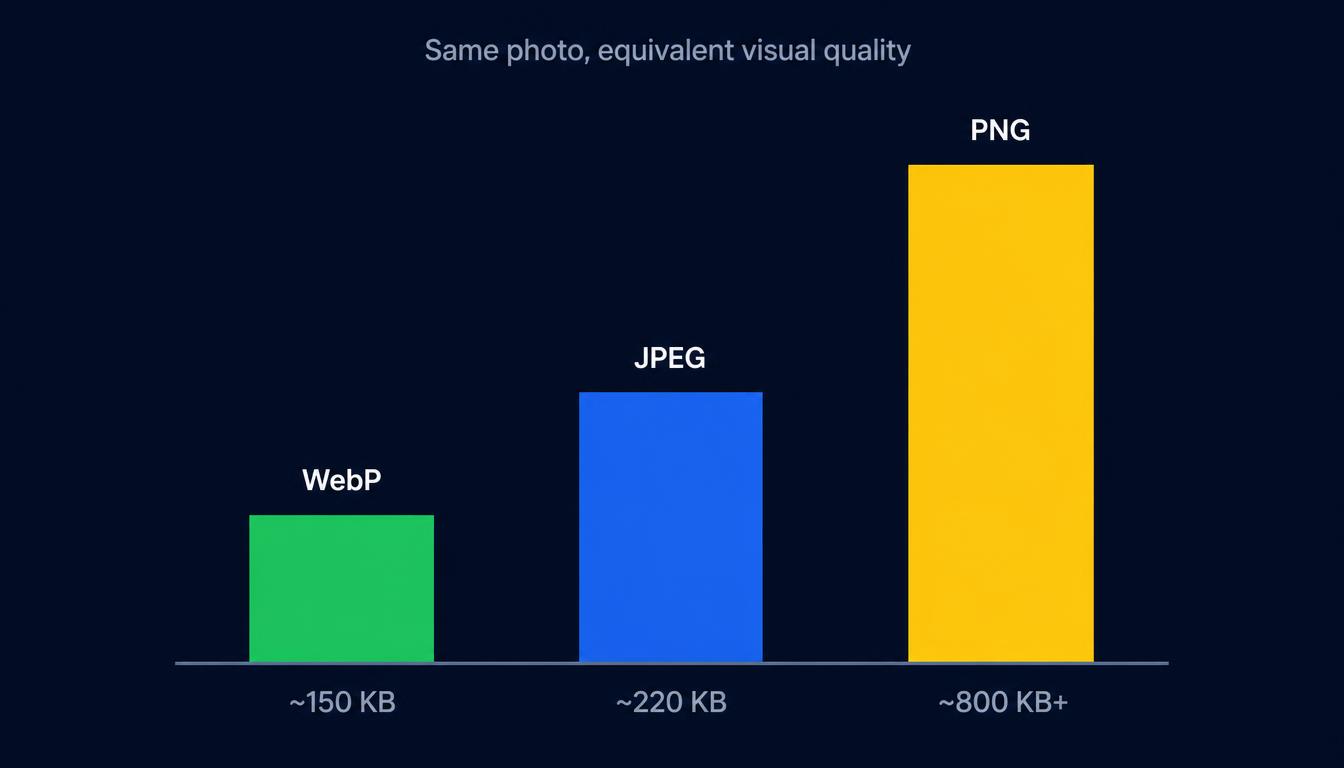
WebP produces files roughly 25-35% smaller than JPEG at the same visual quality, and PNG is the largest of the three for photographs — sometimes 3-8 MB versus WebP's 150-400 KB for the same image. The right choice depends on what you're uploading: a photo, a graphic with transparency, or something in between.
Quick comparison
| Format | Best for | Compression | Transparency |
|---|---|---|---|
| WebP | Photos, general web use | Lossy or lossless | Yes |
| JPEG | Photos (older-browser fallback) | Lossy only | No |
| PNG | Logos, screenshots, graphics needing exact pixels | Lossless only | Yes |
Why WebP wins for most uploads in 2026
WebP was built specifically to replace both JPEG and PNG at once — it supports lossy compression like JPEG and lossless compression with transparency like PNG, in a single format. Browser support now sits above 97% globally, so there's rarely a compatibility reason to avoid it. For product photos, blog images, and general web content, it's the clear default.
When PNG is still the right choice
PNG's lossless compression means zero quality loss, which matters for screenshots with sharp text, logos with hard edges, or any graphic where a single altered pixel would be visible. The trade-off is file size — PNG doesn't compress photographs efficiently at all, which is why a photo saved as PNG can be many times larger than the same photo as WebP or JPEG.
When JPEG still makes sense
JPEG remains useful mainly as a fallback for the small remaining slice of very old browsers that don't support WebP, or in workflows and tools built around JPEG specifically. For a brand-new upload with no legacy constraint, WebP typically outperforms it at the same visual quality.
Practical picks by use case
- Product or blog photos — WebP, for the smallest file size at full visual quality.
- Screenshots with text or UI elements — PNG (or lossless WebP), so sharp edges stay crisp.
- Logos or icons with transparency — PNG or WebP, both support an alpha channel; SVG is better still if the graphic is vector-based.
- Uploading somewhere with strict format requirements — JPEG remains the safest universal fallback.
Whichever format you prefer, PicGlobe currently accepts JPEG and PNG up to 32 MB per upload, so convert WebP, GIF or AVIF files to one of those before hosting them.
Frequently asked questions
Does WebP lose quality compared to PNG?
Lossless WebP matches PNG's quality exactly at a smaller file size. Lossy WebP trades a small, usually imperceptible amount of quality for a much larger size reduction.
Should I convert my PNG images to WebP?
For photographs, yes — the file size savings are substantial. For graphics requiring guaranteed pixel-perfect accuracy, PNG (or lossless WebP) is still the safer choice. Note that PicGlobe currently accepts JPEG and PNG uploads only, so upload JPEG or PNG here and convert to WebP separately if your own website needs it.
Upload your JPEG or PNG images
Free account, up to 32 MB per image, JPEG or PNG.
Upload Your First Image